Introduction
Kits are a type of item that are made up of multiple items, called components. Kits are assembled or boxed together and stored as inventory before being picked as a single sku.
Work Orders are a non-fulfillable order type designed for the kitting process and can only process kit items. Component items for the assigned kits can be picked from the shelves, then assembled into the single kit item, creating inventory. The completed kit items are expected to be stocked on the shelf and later picked for other Sales or Transfer Orders, rather than shipped or delivered outside of the warehouse.
Picking the components is an optional step, Work Stations can be used instead to do the assembly process in a single step.
Kit Items
A kit is a single inventory item made up of multiple component items. It is defined by a Bill of Materials (BOM), which lists the components and quantities required to assemble it. Once assembled or packaged together, the kit is stocked as its own item and can be picked, moved, and managed as a single SKU. Kits can represent either manufactured products or groups of items bundled together for sale.
Kit items are added to Work Orders with a requested quantity. When the Work Order is moved to the picking process, the kit lines are broken out into the components items listed on the BOM and calculated with the quantity needed to fill the order. These items are picked off the shelves.
During the Assembly process, the component items are merged together and inventory for the kit is created.
For more details on how to setup and manage Kits, review the article Kit Items.
Work Orders
Work Orders are made up of 4 objects:
- Order Record - Represents the work order at the highest level, containing all kit item lines, and linking all pick tickets and production runs generated and processed against it. Order Records correspond to the work order object in any host system.
- Work Order Records are simpler than Sales or Transfer Order types and do not contain any customer or shipping information
- Pick Tickets - Represent the picking tasks created against an Order Record that will be batch picked or picked individually. There can be multiple Pick Tickets assigned to a single order.
- Consolidations - Tracks the consumption of components used for assembly against the picked quantities. These are negligible for the completion of a Work Order with no user interaction
- Production Runs - Represent the assembly step that converts component items into the Kit item. Components are tallied and combined, removed from the cart (if picked onto one), and converted into the Kit item inventoried in a cart or location.
Picking is optional for Work Orders. Work Stations can be setup to allow for component items to be combined into a kit within the Assembly app, skipping the Picking app. This can be done by configuring Work Stations and Production Runs, review those articles to see this process.
Work Orders are currently built out with minimal automation for how they are created and managed inside of WarehouseOS. Work Orders must be created in WOS through an API integration with another system, or manually created/imported. Future functionality for automatically created Work Orders based on kit inventory levels will be coming soon.
Work Orders function very similarly to fulfillable orders through the picking phase. Pick tickets are created and assigned a Picking Process and Allocation Process to determine the pick method and how to allocate. A Facility must also be assigned, and once picking begins the Facility cannot be changed. Multiple facilities is not supported on Work Orders.
Create New Work Order
If manually creating and handling Work Orders inside of WarehouseOS, these can be created 2 ways: in the desktop UI or through a bulk import file. How To Use the New Bulk Import Tool is an article that can be referenced with more information on how to create and import orders through import.
Creating a Work Order through the desktop interface is described below.
- Go to Order -> Work Orders -> Orders tab
- Click on Create New

- Enter and Select the order details:
- Order Number (Required)
- Order Process
- Facility
- Any other tags, sequencing, custom fields, etc.
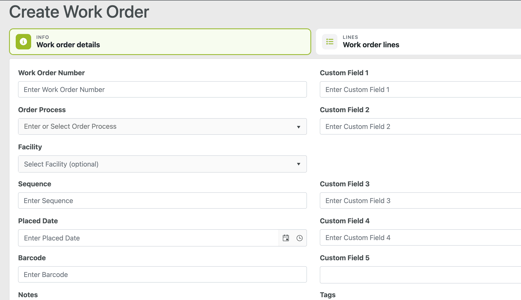
- Open the Work Order Lines tab and Add new lines

- Select a Kit, add a Quantity, and Save

- Add any other kit lines to the order
- Determine if Pick Tickets or Production Runs should be automatically created with the Work Order

- Create Work Order
Additional Definitions
-
Bill of Materials (BOM) - A list of the component items and quantities required to produce one kit.
-
Output Qty- The number of kit items produced from a Bill of Materials during an assembly.
-
BOM/Standard Yield - The percentage of kits produced correctly and without damage or missing components. For example, if 100 kits are produced and 90 are complete and correct, the yield is 90%.
-
Phantom - A kit that is used as a component within one or more parent kits but is not stocked as its own inventory item. When a parent kit is added to a work order, the phantom kit is broken down into its individual components for picking.
-
Scrap Factor - The expected percentage of a component that may be damaged, lost, or unusable during the assembly process.
- Component - A standard inventory item required to build a kit. Components are tracked and inventoried individually.
- Production Run - the last step in the kitting process where components are converted into the kit sku and inventory is created